
Help centre
Remind customers who owe you, on WhatsApp
Open Debts to see who owes you and how late they are. Then open the order, tap WhatsApp and choose Balance reminder: Nfelia writes a polite message with the balance, the day it is due and a link to the invoice, ready to send from your own WhatsApp.
Who can do this Debts is open to the owner and admins. Staff can still see orders with a balance (Orders, then Balance) and record payments, but they do not see the Debts page. See what staff can see.
Where Nfelia keeps who owes you
You do not need to write debts down. When a customer pays part, or says they will pay later, the balance on their order goes into Debts at once, under their name. Debts you add by hand sit in the same list.
- Owed to me shows money customers owe you. I owe shows money you owe suppliers, such as an expense you bought on credit.
- At the top you see the total owed to you, how many debts are open, and how many are late, with their amount.
- The chips filter the list: Open, Late, Paid off and Written off. The menu beside the count sorts it: newest first, due soonest, most owed first or oldest first.
- Each line shows the customer, the order number, when it is due or how many days late it is, the balance and a tag: Not paid, Part paid, Late, Paid off or Written off.

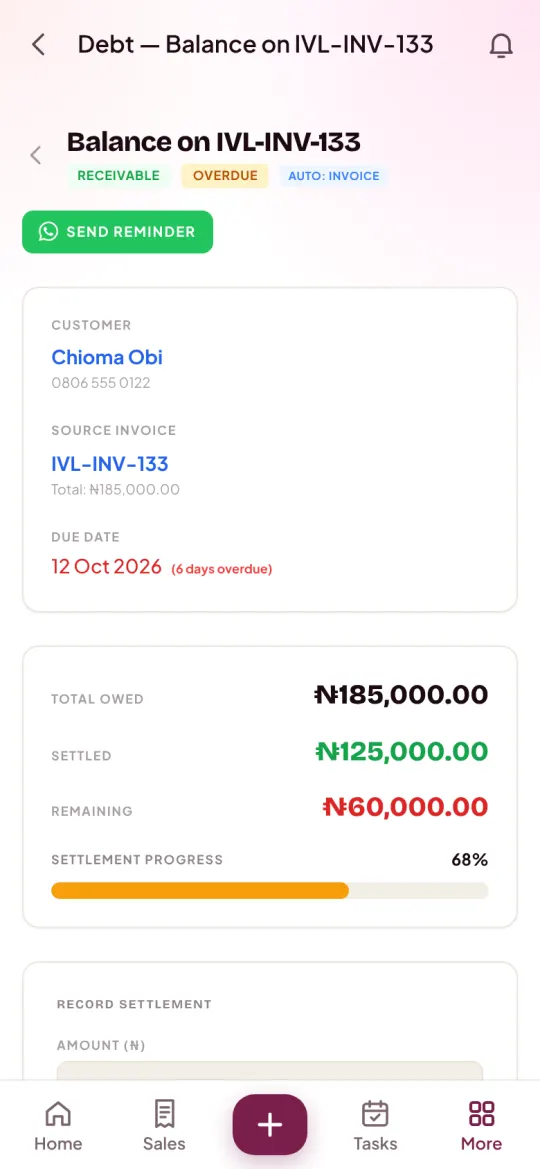
The screens are from Ivie Luxe Hair, an example business.
Send a reminder on WhatsApp
Open Debts
On a phone, tap More at the bottom of the screen, then Debts. On a computer, choose Debts in the menu on the left. You see Owed to me with the total, and the list of open debts.
Show the late ones
Tap Late. Only debts past their pay-by day stay in the list, each with how many days late it is.
Open the customer's balance
Tap the line. A balance from an order opens that order at its Money section. You see the invoice, every payment so far, the balance left and the pay-by day.
Tap WhatsApp, then Balance reminder
Tap WhatsApp under the order's total. A list of ready messages opens. Choose Balance reminder.
Check the message and send it
WhatsApp opens on the customer's chat with the message already written. Read it, change anything you like, and press send. The reminder goes on the order's Log, so you can see later when you last reminded them.
The balance reminder greets the customer by their first name and says, in a friendly way:
- that it is a reminder from your business,
- the order number and the balance on it,
- the day it is due, when you set one,
- and a link to the invoice, which they can open on any phone and save as a PDF.
For ideas on what to say when the first reminder does not work, read our guide to collecting money customers owe you.
Other places to send a reminder
- On an overdue invoice. Once an invoice is past its due date, its page shows Send a reminder under Record payment. The message gives the total, the balance due, how many days past due it is, and the link to the invoice.
- On a debt you added yourself. Open it from Debts and tap the green Send a reminder button at the top. It shows while the debt is open and the customer has a phone number.
- From Tasks. A balance with a pay-by day shows in Tasks as money due from that customer, on Today when the day comes and under Late after it, with a WhatsApp button to remind them. The owner and admins see these. Read more about tasks and reminders.
Set the day they promised to pay
A pay-by day makes the reminder clear and puts the debt on your Tasks list that morning.
Open the order
From Debts or from Orders, open the order with the balance.
Open Money
Tap Money. Under the payments you see Pay by with a date box.
Pick the day and save
Choose the date the customer promised and tap Save. Debts now shows it, and if that day passes without payment, the debt turns Late and shows how many days late it is.
You can set it from the start. When you make a new order with a balance, Nfelia asks when the balance is due: The day they get it, In a week or Pick a day. When you confirm an order from your website, the Balance due by box does the same. Change the day whenever the customer asks for more time.
Record the payment when it comes
Open the order and tap Record payment
You find Record payment at the top of the order and in its Money section.
Enter how much
Type the amount, or tap All of it or Half. The balance is shown above the box.
Choose how they paid
Under Paid by, pick Cash, Transfer, POS or MoMo. Tap Add a reference if you want to keep the transfer or POS reference.
Tap Save payment
A receipt is made for the customer straight away. The balance goes down in Debts, and when nothing is left the debt shows Paid off.
For a debt you added by hand, open it from Debts and use Record a payment: the amount (or Full balance or Half), the method and the date, then Record. Every payment is listed under Payments on the same page. More on receipts in receipts and payments.
Add a debt that is not in Nfelia yet
For money owed from before you used Nfelia, or a loan to a customer, add it by hand.
Tap Add a debt
It is at the top of the Debts page.
Choose Owed to me
Then search for the customer. They must be saved in your Clients first.
Describe it
Write what it is for, the amount, and the due date if there is one.
Tap Record debt
You land on the debt's page, with Send a reminder and Record a payment ready to use.
When a debt will not be paid
If you have stopped expecting the money, open the debt and tap Write off debt at the bottom. Nfelia asks you to confirm, marks the balance as not recoverable, and moves it to Written off, so it stops counting in what you are owed. A debt you added by hand, with no payments on it, can be deleted instead.
Common problems and fixes
Why is there no Balance reminder on the order?
The order must be confirmed and still have a balance. A new order waiting for you to confirm it has no invoice yet, so there is nothing to remind about. Confirm the order first, then open WhatsApp again.
WhatsApp says there is no phone number. What do I do?
The customer has no phone number saved, or the sale was to a walk-in customer. Open the customer's page in Clients, add their WhatsApp or phone number, and try again. Nfelia uses the WhatsApp number first, then the phone number.
Does Nfelia send reminders to my customers by itself?
No. Nfelia does not message your customers about money on its own. You choose when to send each reminder, and it goes from your own WhatsApp, in your name.
Why can't my staff see Debts?
Debts, Expenses and Profit and loss are for the owner and admins. Make a trusted person an admin if they need it. Read how to add staff and choose what they see.
The debt is paid but still shows in the list. Why?
The payment was not recorded on the order or the debt. Open it, use Record payment, and the balance clears at once. A transfer screenshot alone does not change the balance.