
Stock
Stock that counts itself
Nfelia is an inventory app for small shops. Add what you sell once, and every sale takes it off your stock. You see what is running low before customers ask, what your stock is worth, and who changed what, all on your phone.
Add your products once
Tap Add item and fill in what you would tell a new sales assistant: what it is, what it sells for and how many you have. Nfelia does the rest.
- Photos, name and category the same item shows on your invoices, your quotes and your website.
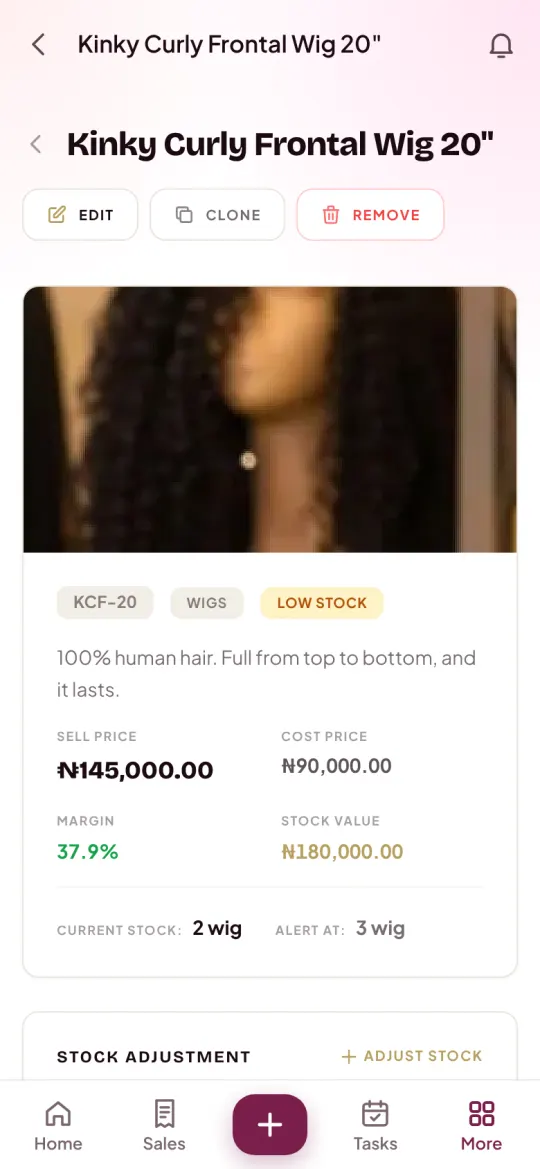
- Selling price and cost price and Nfelia shows your margin, your profit as a share of the price.
- How many you have now saved as your opening stock.
- Counted in your own unit pieces, bundles, yards, metres, cartons, packs, crates, bottles, dozens, kilograms, litres and more.
- Remind me at the number that means “time to restock”. It starts at 5; set it per item.
- Options like length, colour or size, each with its own price if you like. Options share the item’s one stock count.
Selling a service, like styling or a repair? Switch on This is a service and there is no stock to count. Got a long list? Add many items at once from a spreadsheet: only the name is needed, and price, cost, stock and unit come in too. You can download your list as a spreadsheet any time.
Every sale takes it off
You never count down by hand after a sale. When an order is confirmed, the items on its invoice come off your stock. If anything changes, Nfelia moves only the difference:
| When this happens | Your stock |
|---|---|
| An order is confirmed, in the shop or from your website | Goes down by what was sold |
| The items on an order are changed | Moves by the difference only |
| An order is cancelled | Gets back exactly what it lost |
| You record a stock purchase from a supplier | Goes up by what you bought |
| You tap Add stock, Take out or Set the count | Changes as you say, with your note |
Each item keeps a Stock history of its last 50 changes: how many, the count after, why, and who did it. When staff sell, their sales come off too, so goods that go missing show up quickly.
Know before you run out
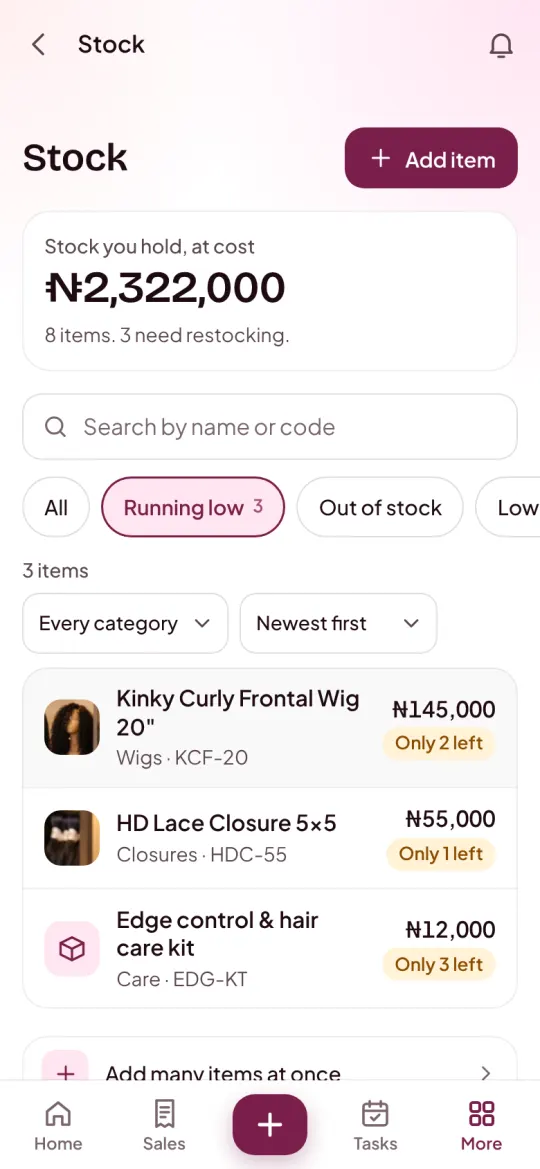
Your catalogue opens on what matters: Stock you hold, at cost, how many items you have, and how many need restocking. Tap a filter to see only what is Running low, Out of stock, or both.
- Every changewritten down, with who made it and why.
- At costthe value of what is on your shelves, worked out for you.
- Once a daya low-stock warning, never a buzz for every sale.
- A daily warning once a day from 9am Nigeria time (8am in Ghana, 11am in Kenya), you and your team hear which items are running low or out, the most urgent first.
- On your Home items to restock are part of what needs you today.
- On your website, if you want switch on “Show items as sold out when their stock runs out” in Shop Studio. Customers then see Sold out and an Ask when it’s back button for WhatsApp, instead of ordering what you don’t have.
Restocking is cheaper when you know what sells. For a simple routine, see how to track stock in a small shop, and to set prices that leave a profit, how to price your products.
Joined to everything else
Stock in Nfelia is not a separate spreadsheet. The same items run through your whole business.
- Invoices and quotesOn a new order, pick items from your stock with the price filled in and how many you have shown, so you never sell what is not there.
- Your websiteYour catalogue is your shop. Turn off Show on my shop to keep an item off it.
- Expenses and profitStock bought from suppliers is an expense, and comes into your stock at the same time.
- The Records BookYour stock is in the Excel workbook of all your records, ready to show your bank.
Who it helps
Shops where every item counts.
- Phones and gadgetsEach model with its own count, and a warning before the popular one runs out.
- Online sellersHair, clothes, shoes and beauty, counted down as orders come in.
- Fashion designersFabric in yards, so you know what is left before you take the next job.
- Food and cateringPacks, crates and bottles, bought as stock purchases and counted.
Questions people ask
How does the stock go down when I sell?
When an order is confirmed, its invoice is made and the items on it come off your stock. Cancel the order and exactly that much goes back.
Can I add all my products at once?
Yes. In your catalogue, tap Add many items at once and upload a spreadsheet saved as CSV. Only the name is needed; price, cost, stock, unit and category can come in too.
Does it count sizes and colours separately?
No. Options like size or colour share the item’s one stock count. If you need a separate count for each, add each one as its own item.
Will it tell me when something is running low?
Yes. Set the Remind me at number on each item. Once a day from 9am Nigeria time (8am in Ghana, 11am in Kenya), you hear which items are at or below it, and your catalogue can show only those.
Can I see what my stock is worth?
Yes. Your catalogue shows the stock you hold at cost, and each item’s page shows its price, cost, margin and how many are left.
What if my count is wrong after a stock check?
Open the item and tap Set the count to the number you counted. The change goes into its stock history with your note.
Let your stock count itself
Use everything free for 14 days. No card needed. Free setup help on WhatsApp.