
Help centre
Make your Records Book and let anyone check it
Open Your records and tap Make my Records Book. In a few minutes you get one Excel workbook with all your customers, sales, money and stock, in your colours. Every record in it has a code that a bank, a landlord or a buyer can check at nfelia.com/verify.
Who can do this Only the owner can take the business's records out of Nfelia. Your records stays open even when your plan has ended, for the 12 months we keep your records after you stop paying: they belong to you, paid up or not.
What the Records Book is
It is an Excel file (.xlsx) made from everything you have recorded in Nfelia. It opens in Excel, Google Sheets, LibreOffice and Numbers.
- A cover with your name, colours and figures, and a QR code to check the book.
- At a glance: totals for sales, money in, spending and what is owed, a table of every month and a chart.
- A sheet for each kind of record, grouped as People, Selling, Money, Stock, and Planning and your shop: customers, orders, invoices, receipts, payments, expenses, debts, products, stock movements, tasks and more. Invoices, receipts and the other documents each have a link to open them and a verify code of their own.
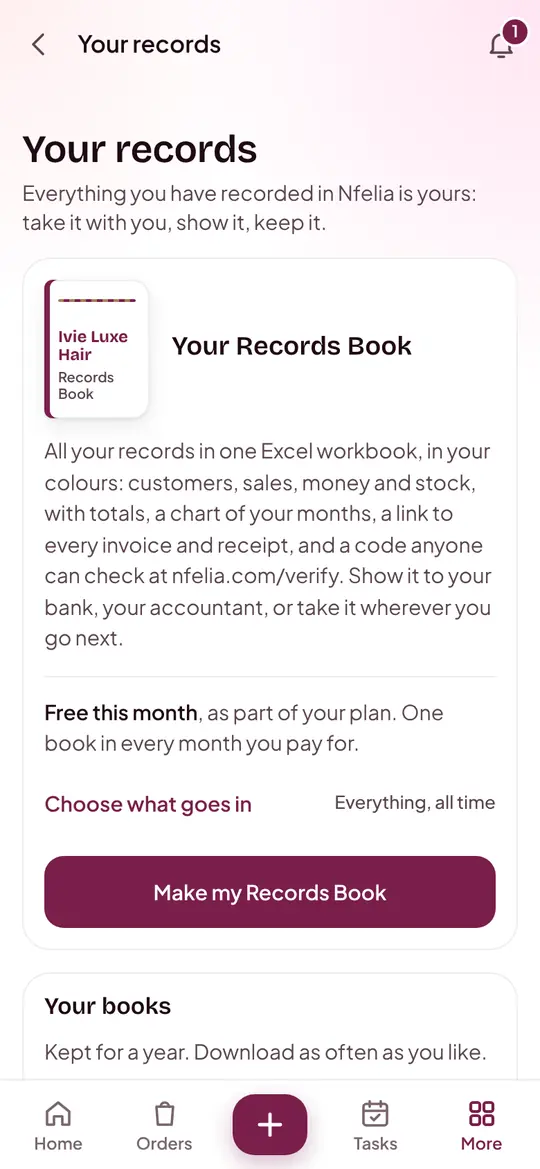

The screens are from Ivie Luxe Hair, an example business.
What it costs
- Free once in every month you pay for. Nfelia costs ₦10,000 a month in Nigeria, and each paid month includes one book.
- Another book in the same month, or a book during the free trial or after your plan has ended: ₦7,500 each.
- Your plain copy (every record as CSV files) is free, always.
Paying for a book works like paying for Nfelia: with Paystack in Nigeria, or by Mobile Money with a receipt where that is how Nfelia is paid. See billing and payments.
Make your Records Book
Open Your records
On a phone, tap More, then Your records under Data. On a computer, it is in the menu on the left. You see Your Records Book and a line saying whether this month's book is free.
Choose what goes in, if you want to
Tap Choose what goes in. Under Which records, pick All time, This year, The last 12 months, Last year or Dates I choose. Untick any sheets you do not need. Leave it alone for everything, all time.
Tap Make my Records Book
Outside a free month the button says Get my Records Book for with the price, and you pay first. While Nfelia makes the book, the button says Making your book.
Download it
When it is ready, Nfelia tells you: "Your Records Book is ready". It appears under Your books with a Download button. Books are kept for a year, and you can download them as often as you like.
Showing your records to a bank for a loan? Our guide to business records for a loan explains what lenders look for.
Your plain copy, free
Further down Your records, under Your plain copy, tap Get my plain copy. You get every record as it is kept, in CSV files any spreadsheet opens, in one ZIP file. It is free whatever your plan, so your records are never locked in.
How anyone checks it at nfelia.com/verify
Every quote, invoice, receipt, delivery note and deed made with Nfelia carries a code and a QR code, and so does every Records Book and each record in it. Nobody needs an account to check one.
Open nfelia.com/verify
Go to nfelia.com/verify, or scan the QR code with a phone camera.
Type the code
Under The code, type it as it is printed: 10 letters and numbers, like K7Q2M-XA9WT, sometimes with more after it. It is at the foot of a document, on the cover of a book, or in a record's Verify column. Tap Check it.
Read the answer
A genuine record shows Genuine with its key facts: the business, the amount and the status, and who signed it. It never shows a customer's phone, email or address.
Someone who received the Excel file itself can choose it under Check the file. Nfelia reads only its fingerprint and says whether it is exactly as Nfelia made it. The file is not kept.
Other answers they may see: Genuine, since removed when you deleted the record later; a note that a book is more than a year old, when Nfelia can confirm the code but no longer what it said; and We can't find that code when it was typed wrong. Codes never use the letters I, L, O or U.
When someone asks for a record
After checking a code, a lender or buyer can ask you for the full document. They give their name, email, organisation, what they are and why they need it, and confirm their email.
You get an alert and an email
The request waits in Your records under People who asked for your records. Nothing is shared unless you say yes.
Open it and read why
You see who asked, when, and their reason.
Approve or decline
Tap Approve and share it and Nfelia emails them a link to download it, which works for 7 days. Tap Decline and they are told politely.
Common problems and fixes
I can't find Your records.
It is for the owner only. Staff and admins do not see it. On a phone, look under More, in the Data section.
It says my Records Book needs another try.
You have a lot of records. Choose a shorter period, a year for example, under Choose what goes in, and make it again. Nothing was charged for the book that did not work.
Is my free book used up if I make one early in the month?
Yes, one free book comes with each paid month. Make it when you need it, or pay for another. The page tells you when your next free one comes.
The bank says the code is not found.
Check it was typed exactly, without spaces in the wrong place, or scan the QR code instead. Codes have no I, L, O or U, so a "0" is a zero.
Can I open the book on my phone?
Yes, with Google Sheets, Excel or Numbers on your phone. It is easier to read on a computer or tablet.