
Guide
Know what is on your shelves: a simple way to track stock
To track stock in a small shop you need three things: a count you trust, a record of everything that comes in and goes out, and a number for each item that tells you when to reorder. Here is a simple way to do all three, on paper or on your phone.
Stock is money sitting on a shelf. When you do not know how much you have, two things happen. Your best sellers run out and customers buy from the shop next door. And slow items pile up in the store, holding money you could have used. Tracking stock fixes both, and it shows you when goods are leaving without being paid for.
Why stock goes missing
Shop owners call it "shrinkage": stock that leaves the shelf without a sale being written down. It is rarely one big theft. It is usually many small things:
- Sales nobody wrote down. A quick cash sale while you were busy, a transfer you meant to note later.
- Goods taken on credit and never added to the list of who owes you.
- Damage and expiry. A leaking tin, a torn bag, food past its date, thrown away and forgotten.
- Items taken for home, given as samples or as a gift to a good customer.
- Short deliveries. The supplier's invoice says 24, the carton holds 22, and nobody counted.
- Theft, by customers or, sadly, sometimes by staff.
You cannot fix what you cannot see. A count and a stock sheet make it visible.
Start with a proper count
Your first full count is your starting point. Everything after it is measured against it.
Pick a quiet time
Before you open, after you close, or on your day off. Counting while you sell gives you a number that is already wrong.
Count shelf by shelf
Start at one end and work round. Do the store room too. Two people work best: one counts, one writes.
Count in the unit you sell
If you sell single tins but buy by the carton, count tins. If you sell by the carton, count cartons. Mixing units is how counts go wrong.
Write the cost beside each item
What you paid for one. Count times cost gives what your stock is worth, which is money you have already spent.
A simple stock sheet to copy
A stock sheet is a table with one row per item. For each period (a week or a month) it answers one question: how many should I have, and how many do I have?
| Item | Opening | In | Sold | Other out | Should have | Counted | Difference |
|---|---|---|---|---|---|---|---|
| Rice, 50 kg bag | 12 | 10 | 15 | 0 | 7 | 7 | 0 |
| Vegetable oil, 5 litres | 24 | 12 | 25 | 1 leaking | 10 | 9 | −1 |
| Noodles, carton | 30 | 20 | 38 | 0 | 12 | 10 | −2 |
How it works, column by column:
- Opening: what you counted at the end of the last period.
- In: what came in from suppliers, checked against their invoice.
- Sold: from your sales book, invoices or receipts.
- Other out: damaged, expired, samples, taken for home. Always with a reason.
- Should have: opening + in − sold − other out.
- Counted: what is really on the shelf.
- Difference: counted − should have. Zero is the goal. A minus means stock left without a record.
In the example, the rice is right, one tin of oil is missing and two cartons of noodles are gone. That is where to look first: was a carton sold on credit and not written down? Did the last delivery come short?
Set a reorder level for each item
A reorder level is the number that tells you "order now". When stock falls to it, you buy, and the new goods arrive before you run out. Work it out like this:
Reorder level = what you sell in a day × (days your supplier takes + a few spare days) Say you sell 3 cartons of noodles a day, your supplier takes 4 days to deliver and you keep 2 spare days for delays. 3 × (4 + 2) = 18. Order when you are down to 18 cartons.
Then decide how much to order. Enough for one or two weeks is a good start for most goods: at 3 a day, two weeks is about 40 cartons. Give fast sellers higher levels and slow items lower ones, and check the levels every few months, because what sells changes with the season.
If an item sells slowly, do not stock deep just because the supplier offers a discount for buying more. Money stuck in slow stock cannot buy the goods that sell.
Find and cut shrinkage
Add up the differences across the shop at cost. Say your stock sheet says you should have stock worth 850,000 at cost, and your count finds 824,500. That is 25,500 missing: 3% of your stock. Example figures; they read the same in any currency.
Then cut it, one cause at a time:
- Write every sale, cash ones too. If a sale is not recorded, it looks the same as a theft on your stock sheet.
- Record credit at the moment you give it. Goods on credit are sold goods with money still owed, not missing goods.
- Write out damaged and expired stock with a reason before you throw it away.
- Count deliveries before you pay. Check the cartons against the supplier's invoice while the delivery person is still there.
- Spot-check expensive small items often. Phones, perfume, hair bundles and phone accessories are easy to pocket.
- Give each staff member their own record of what they sold, so a shortfall can be traced to a shift.
How often to count
- A full count every month, or every three months in a quiet shop.
- A spot check every week of your ten most valuable or fastest-selling items. It takes ten minutes.
- A daily count of small, high-value items, such as phones in a gadget shop.
The more often you count, the smaller each difference is, and the easier it is to remember what happened.
How Nfelia helps
Nfelia keeps the stock sheet for you, from the sales and purchases you already record. Every item in your Catalogue has its own stock count:
- Sales take stock off. When you send an invoice, the items on it come off your stock. Cancel the invoice and they go back.
- Purchases put stock in. Record buying goods as a Stock Purchase expense and pick the items: they are added to your stock with what you paid.
- Add stock, Take out, or Set the count. Each change can carry a note, such as "damaged" or "new stock from the supplier". After a count, Set the count fixes the number and the change shows as "Count corrected".
- A stock history for every item. The item's page lists its latest changes, each with the date, the note and who made it. This is your "other out" column, kept for you.
- Your reorder level. Type it in "Remind me at" and Nfelia reminds you to restock when the item gets down to that number. The "Low or out" list shows everything that needs restocking.
- What your stock is worth. Add a cost price and each item shows its stock value at cost.
- Many products at once. Add them from a list, and download your whole stock list as a file whenever you need it. Your website shows up to 500 of them.
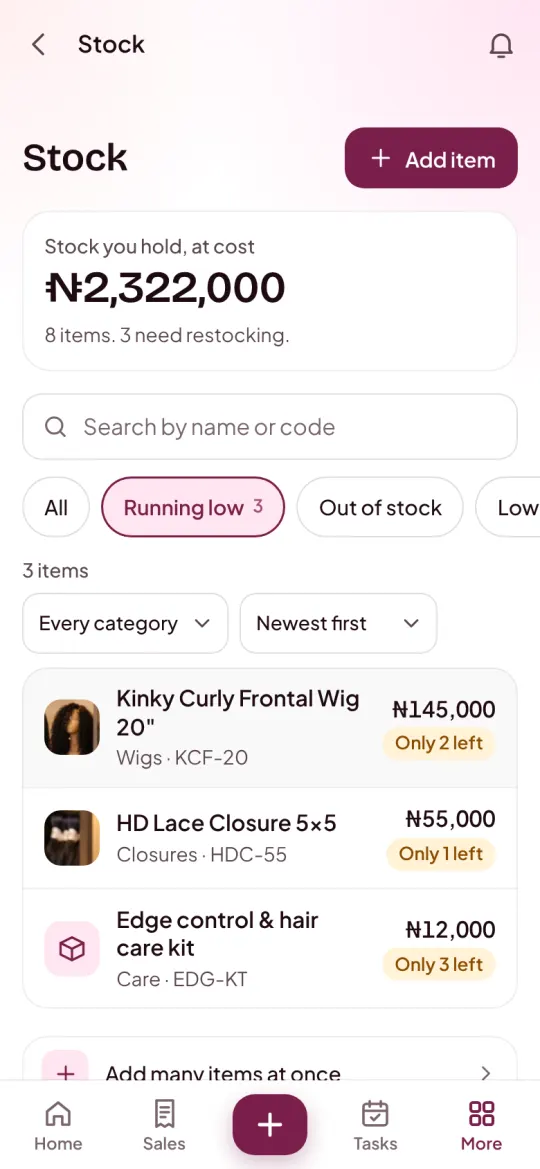
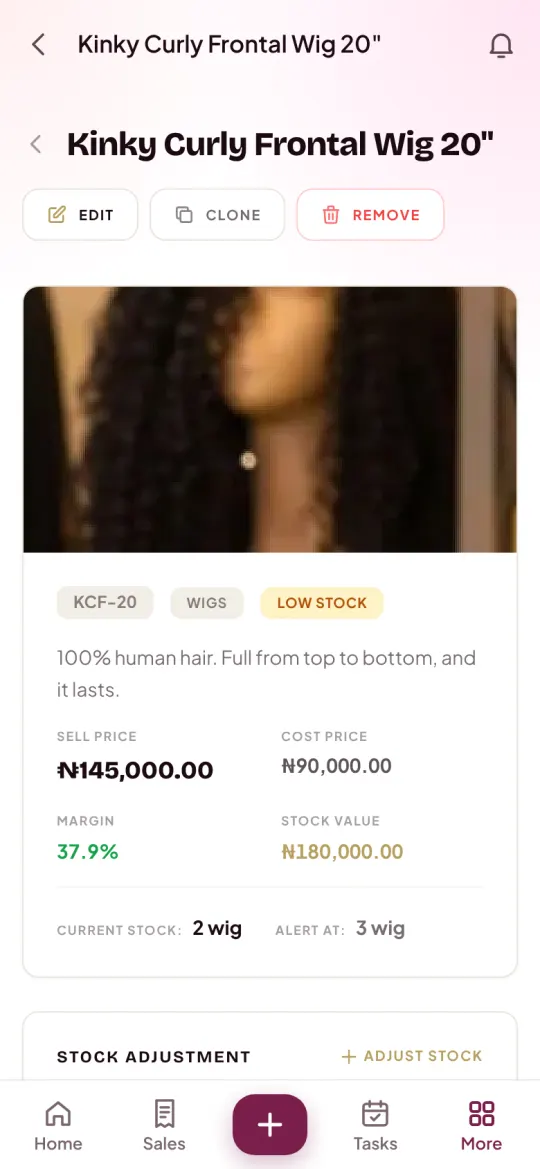
Nfelia counts what you record. It cannot see goods that leave without a sale, so you still need to count your shelves. The difference is that you compare your count with a number Nfelia already worked out, and the stock history shows where to look. The screens are from Ivie Luxe Hair, an example business. Read more about stock tracking in Nfelia, or follow the stock help guide and the guide to adding your products.
Questions people ask
What is a reorder level?
The stock number at which you order more, so new goods arrive before you run out. Work it out as what you sell in a day times the days your supplier takes, plus a few spare days. At 3 a day, a 4-day delivery and 2 spare days, reorder at 18.
What is shrinkage in a shop?
Stock that leaves without a sale being recorded: theft, damage, expiry, short deliveries, goods taken for home, and sales or credit nobody wrote down. Find it by comparing what you should have with what you count.
Should I value my stock at cost or at selling price?
At cost, for what your stock is worth to you: it is money you have already spent. The selling price shows what it could bring in if it all sells. Our guide to pricing your products explains the gap between the two.