
Help centre
Take bookings with a deposit on your website
Turn on bookings for a service in your Catalogue, choose how long it takes and the deposit, and set your booking hours. Customers then pick a free time on your website and pay the deposit by transfer. You check the money and tap Confirm and add to my calendar.
How bookings work
- Customers only see free times. Nfelia shows times inside your booking hours that are not taken by another booking or by an appointment in your Tasks and Calendar, so you are not booked twice.
- The deposit goes to your own account. Customers pay it by transfer to the payment account on your website. Nfelia takes no commission.
- You stay in charge. Every booking arrives as a request. It holds its time for 24 hours while you check the deposit, and only goes on your calendar when you confirm it.
It suits salons and barbers, nail and lash studios, fittings with a tailor, repairs, photo shoots, event packages, and rooms or apartments let by the night.

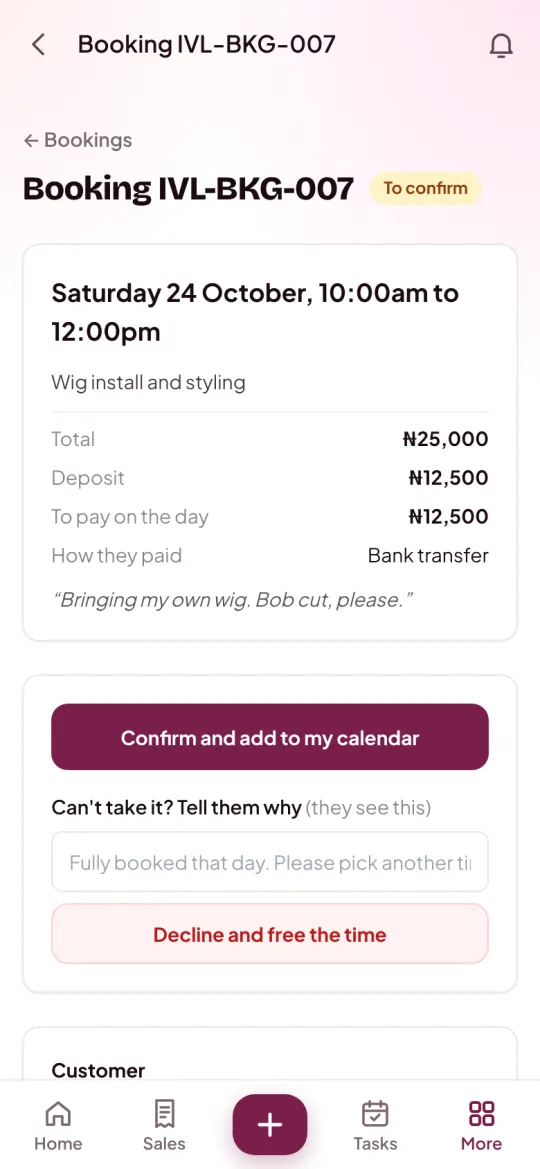
The screens are from Ivie Luxe Hair, an example business.
Turn on bookings for a service
Open the service in your Catalogue
On a phone, tap More, then Catalogue, then the service. Tap Edit. New to the Catalogue? Read how to add your products first.
Find the Bookings section
It shows for services, and for any business that sells services. If you do not see it, tick This is a service in the Stock section.
Choose how people book it
Under People book this, pick A time slot, like an appointment, By the night, like a room or apartment, or A whole day, like an event.
Say how long, or how many
For a time slot, choose How long it takes, from 15 minutes to 8 hours. For a whole day, type Bookings you can take a day.
Set the deposit
Under Deposit to book, choose A share (%) or An amount, then type How much. Or choose No deposit.
Tap Save changes
Your website now shows a button on it: Pick a time and book, Pick a day and book or Check dates and book.
Check your payment account Customers pay deposits to the account your website shows. The owner adds and changes it in Settings, Business, under Payment accounts.
Set your booking hours
Open Booking hours
Tap More, then Bookings under Storefront, then Booking hours. You can also tap Set your booking hours under the deposit on any service.
Tick the days you open
Under Opening hours, tick each day and set its opening and closing time. An unticked day shows as Closed.
Set the rules
Book at least how long ahead, Book up to how far ahead, and Start times every 15 minutes, 30 minutes or hour.
Say how many at once
Customers at the same time is for time slots. Two stylists working together? Put 2.
Tap Save booking hours
Your website offers only times inside these hours from now on.
Confirm a booking request
When someone books, you get an alert, and the request waits in Bookings under Requests.
Open Bookings
Tap More, then Bookings. The tabs are Requests, Coming up and Past.
Open the request
You see the booking number with the tag To confirm, the time, the service, the deposit and what is left to pay, the customer's note, and the proof of the deposit when they sent one.
Check the money in your bank app
A screenshot alone is not proof. Look for the deposit in your bank or Mobile Money app first.
Tick that you have the deposit
Tick the box I have the [amount] deposit. Nfelia makes a receipt for it, so it counts in your money in.
Tap Confirm and add to my calendar
You see that the booking is confirmed and added to your calendar, with the deposit's receipt number. It moves to Coming up.
Can't take it? Write a short reason in Can't take it? Tell them why and tap Decline and free the time. The customer sees your message and the time opens up for someone else.
After you confirm
- The booking is an appointment in Tasks on its day. A time-slot booking also gets a reminder an hour before (in Nigeria time for now: two hours late in Kenya, an hour early in Ghana). See tasks and reminders.
- The customer has their own booking page with the time, the deposit and what is left to pay on the day. Its link is on the booking, under Their booking page.
- The booking page in Nfelia has a WhatsApp button to message the customer, and their phone and email.
- When the job is done, open the booking and tap Mark as done. If plans change, use Cancel this booking, with a message they will see.
Rooms and apartments by the night
Choose By the night, like a room or apartment and the price becomes a price per night. You can add:
- a refundable Caution fee, paid with the booking. It is not counted as income, and Nfelia reminds you to give it back after check-out. Tap I've given it back on the booking when you do.
- Cheaper for longer stays: a lower price a night from a number of nights you choose.
- Check-in from, Check-out by and up to 8 House rules, in Booking hours. Guests see them before they pay.
Common problems and fixes
Why don't I see the Bookings section on my item?
It shows for services. Tick This is a service in the item's Stock section, and the Bookings section appears below.
Customers say no times are free. What is wrong?
Check Booking hours: the day must be ticked, and Book at least and Book up to must leave room. Times also close when another booking or an appointment in your calendar takes them, or when the number in Customers at the same time is reached.
A request is more than a day old. Can I still confirm it?
Yes, if the time is still free. A request holds its time for 24 hours. After that, if someone else booked the same time, Nfelia tells you so: agree another time with the customer.
Does Nfelia collect the deposit for me?
No. Customers pay you directly, by transfer to your own account, and you confirm once you see the money. Nfelia never holds your money.
Can my staff confirm bookings?
Yes. Bookings is open to everyone on your team. Read what staff can see.